Woobox provides a quick and easy method for embedding campaigns within an external website. In Classic Campaign Types, you can find embed codes on the Overview page where you see Embed on Website.

In new AI Sites, click on the </> icon in the upper right corner of the Builder section.
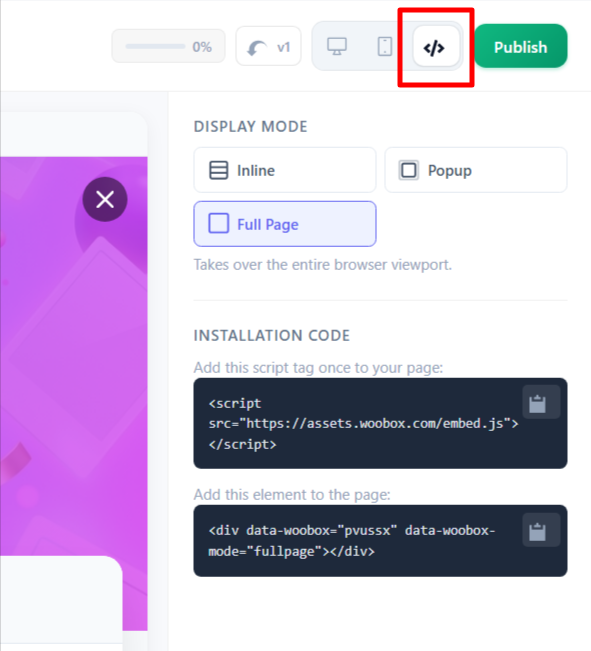
Simply copy the the code from Steps 1 and 2 and paste it into the HTML of your website.
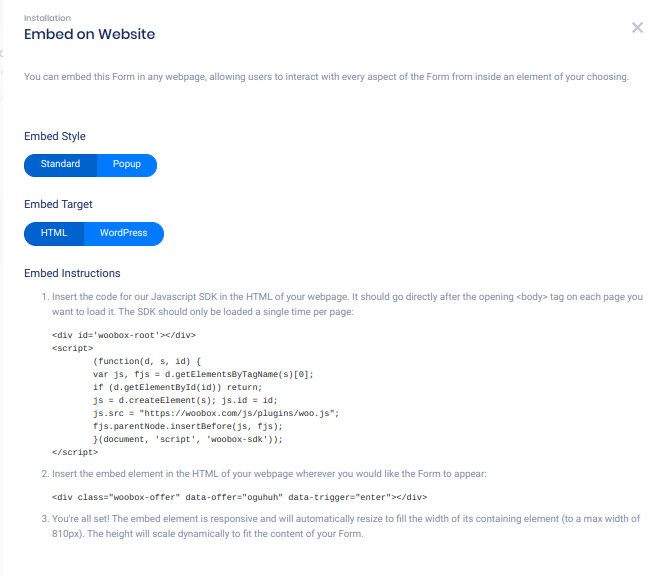
Additionally, for reference, we’ve explained the process here.
Using the block of HTML/JavaScript below, you can embed this campaign in any webpage, allowing users to interact with every aspect of the promotion from inside an element of your choosing.
Follow the instructions to embed this campaign on a webpage of your choosing:
Step 1) Insert the embed code for our JavaScript SDK in the HTML of your webpage, preferably after the opening <body> tag:
<div id='woobox-root'></div>
<script>(function(d, s, id) {
  var js, fjs = d.getElementsByTagName(s)[0];
  if (d.getElementById(id)) return;
  js = d.createElement(s); js.id = id;
  js.src = "//woobox.com/js/plugins/woo.js";
  fjs.parentNode.insertBefore(js, fjs);
}(document, 'script', 'woobox-sdk'));</script>
Step 2) Then place the embed element in the HTML of your webpage wherever you would like the campaign to appear:
<div class='woobox-offer' data-offer='123abc'></div>
NOTE: The data-offer attribute is the unique offer URL shard, the last piece of the promotion’s shareable URL.
PRO TIP:
To center the embedded promotion on your site add style=”margin:auto;” to the code in Step 2.
